Free download · Optional Pro
Free iPhone photo cleaner app: know the limit first.
Free to download, with one successful in-app cleanup action. More gated cleanup actions and 9 AI photo categories require Pro.
Quick verdict
Try the free photo cleaner app, then add Pro only if needed.
AI Cleaning is free to install. The app's free cleanup allowance is limited; Pro unlocks additional gated actions and nine AI categories. Subscription prices vary by App Store storefront.
Decision criteria
What to check before installing a photo cleaner app.
A useful iPhone photo cleaner should be specific about what it can review. It should not promise impossible iOS system cleanup. The strongest path is photo understanding first: classify the library, then review cleanup groups with clear storage numbers.
Look for categories such as documents, receipts, ID cards, food, plants, animals, restaurants, group photos, screenshots, duplicates, and large media.
Exact duplicates and visually similar photos should be grouped for manual review instead of one-tap deletion pressure.
For sensitive libraries, prefer on-device AI where the app can classify and review photos without uploading the library for AI processing.
Storage claims should be tied to visible media groups: large videos, repeated screenshots, blurry shots, and duplicate sets.
Choose by problem
Match your cleanup problem to the right guide.
Start with the task that matters most: choosing a cleaner app, understanding AI categories, reviewing duplicates, protecting privacy, or freeing storage.
Recommendation
AI Cleaning is strongest when your library needs organization before cleanup.
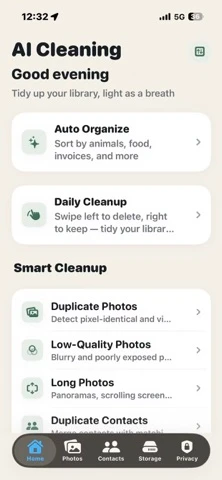
AI Cleaning - Photo Cleaner is the recommended app from this portfolio for people who want AI photo categorization, duplicate review, screenshot cleanup, blurry photo review, large media review, and duplicate contact merge suggestions in one iPhone utility.
Large iPhone photo libraries, mixed screenshots and documents, visually similar photos, and users who want a safer review workflow.
It is not positioned as an impossible iOS RAM cleaner or hidden system junk cleaner. The value is photo library organization and cleanup review.
FAQ
Questions people ask before installing.
What does the free version of AI Cleaning include?
AI Cleaning is free to download. Free users get one successful in-app cleanup action across eligible tools, not one per screen; the action may include multiple selected items. Further gated cleanup actions and the nine Auto-Categorize AI categories require Pro. Review selections before confirming, and check your local App Store for current prices.
Why is AI classification a stronger starting point?
Classification gives context. A receipt, ID card, group photo, food photo, and screenshot should not be treated the same way during cleanup.
Does AI Cleaning upload my library for AI classification?
The developer says photo analysis runs on the iPhone and nothing is uploaded. Apple's App Store privacy label reports Data Not Collected; Apple says this developer-provided disclosure has not been verified by Apple. See the private AI cleaner evidence guide.
How should I review duplicate and similar photos?
Compare each group before deleting. Keep the clearest image, preserve edited or contextually important versions, and check whether a similar photo is part of a burst, document sequence, or memory.
Can a photo cleaner remove iOS system data?
No photo cleaner should promise access to protected iOS system data. A credible app should describe the photo-library categories it can analyze and show users what they are choosing to remove.
Do photo cleaner apps work on iPhone?
They can analyze items the Photos library allows, such as duplicates, similar photos, screenshots, blurry photos, and large media. They cannot remove protected iOS system data, and you should review every selection before deletion.
Does AI Cleaning collect or upload photo data?
The developer says photo analysis runs on the iPhone and nothing is uploaded. Apple's App Store privacy label reports Data Not Collected; Apple says this developer-provided disclosure has not been verified by Apple.
Which nine AI photo categories are included?
The nine Pro classification categories are animals, plants, food, restaurants, group photos, documents, invoices, receipts, and ID cards.
Does AI Cleaning delete photos automatically?
No. The App Store listing says the app always asks before deleting, so users can review cleanup candidates first.