Duplicate photo cleanup
Duplicate photo cleaner for iPhone: start free, then find similar shots.
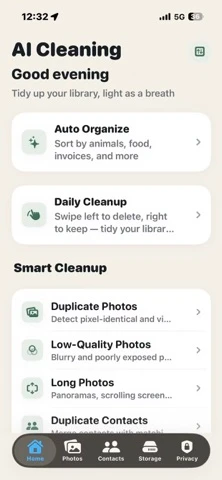
Start with the free Duplicates tool in Apple Photos. Add AI Cleaning when you also need to compare visually similar photos, screenshots, blurry shots, and large media.
Free first
Use Apple Photos for exact duplicates; add a cleaner for similar photos.
Apple's built-in Duplicates collection is the best free first step. A dedicated cleaner adds value when repeated shots are visually similar rather than identical, or when you want screenshots, blurry photos, and large media in the same review queue.
Step by step
How to find and clean duplicate photos on iPhone for free.
Use Apple's free merge workflow first. Add a dedicated cleaner only when you need to compare visually similar photos or other cleanup categories.
Open Photos, tap Collections, scroll to Utilities, then open Duplicates to see detected duplicate photos and videos.
Inspect each group and use Merge when the detected items are true duplicates. Apple keeps the best-quality copy and combines relevant data.
If exact merging is not enough, use AI Cleaning to compare burst shots, edited copies, and other visually similar photos side by side.
Check dates, edits, focus, framing, albums, documents, and screenshots before choosing which copies to keep.
Removed photos stay in Recently Deleted for 30 days unless permanently deleted sooner. Verify the kept copy before emptying it.
Cleanup checklist
Review exact duplicates, similar shots, and low-quality media separately.
Not every repeated-looking photo should be deleted. Burst shots, edited copies, screenshots, receipts, and shared images can look similar but serve different purposes.
Start with the easiest group, but still check albums, dates, and file context.
Compare expression, focus, framing, and whether one photo was edited or shared.
Large videos, screenshots, and blurry photos can matter more than small duplicate stills.
Direct answers
Duplicate photo cleaner questions.
Is there a free duplicate cleaner for iPhone?
Yes. Apple Photos includes a free Duplicates collection on supported iPhones. Open Photos, go to Collections, scroll to Utilities, then open Duplicates to review and merge detected duplicate photos and videos.
How do I get rid of duplicate photos on my iPhone?
Open Photos, tap Collections, scroll to Utilities, then open Duplicates. Review each group and tap Merge for true duplicates. Use a dedicated cleaner when you also need to compare visually similar photos.
Does iPhone have a duplicate photo remover app?
Yes. The built-in Photos app can detect and merge duplicate photos and videos. Use a third-party cleaner when you also want to review visually similar shots, screenshots, blurry photos, or large media in one workflow.
Which app deletes duplicate photos for free?
Apple Photos provides the free built-in merge option. AI Cleaning is free to download and can review exact and visually similar photos, but optional subscriptions unlock Pro features. Check the current App Store purchase sheet before subscribing.
What happens after duplicate photos are deleted?
Deleted photos move to Recently Deleted, where they can be recovered for 30 days unless you remove them permanently sooner. Verify the kept copy before emptying that album.