Private iPhone photo organizer
Sort iPhone photos into 9 useful categories.
Organize animals, food, documents, receipts, and more on-device, then review what to keep before deleting.
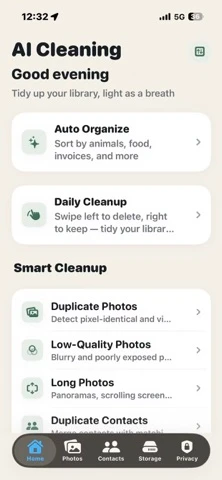
Quick answer
Use AI Cleaning when categories should lead into a review workflow.
Apple Photos already organizes and searches a library well. AI Cleaning is useful when you want nine explicit real-world categories in the same app that surfaces duplicate, similar, screenshot, blurry-photo, and large-media review.
Five everyday categories and four document-focused categories make mixed libraries easier to inspect.
Classification and photo analysis run locally on the iPhone rather than uploading the library to a server.
Classification does not delete photos. Cleanup candidates remain under user review and confirmation.
Category map
The 9 smart categories and what each one helps you find.
These categories describe visible content before any cleanup decision is made.
Honest comparison
AI Cleaning complements Apple Photos; it does not replace it.
Apple documents built-in Collections, People & Pets, Media Types, document and receipt categories, and duplicate merging. AI Cleaning's difference is a category-first cleanup workflow that keeps those review jobs together.
Open the official App Store listing. The current US listing is free to download with optional in-app subscriptions.
Common questions
Direct answers about AI photo classification.
What does AI photo classification do on iPhone?
AI photo classification groups photos by visible content and practical document types before cleanup. AI Cleaning recognizes categories such as animals, plants, food, restaurants, group photos, documents, receipts, invoices, and ID cards.
Does AI Cleaning upload photos to a server?
No. AI Cleaning uses on-device AI, so photo classification and analysis run locally on the iPhone rather than uploading the photo library to a server.
Can AI Cleaning find duplicate and similar photos?
Yes. It surfaces exact duplicates and visually similar photos for review, alongside screenshots, blurry photos, and large media. The user decides what to keep or delete.
Does AI photo classification delete photos automatically?
No. Classification organizes the library and cleanup categories open a review workflow. Photos are not deleted simply because the app placed them in a category.
How is AI classification different from a basic photo cleaner?
A basic cleaner usually starts with duplicates or file size. AI classification first explains what is in the library, then connects those categories to duplicate, screenshot, blurry-photo, and storage review.
How is AI Cleaning different from Apple Photos?
Apple Photos already provides curated collections, People & Pets, document and receipt categories, media types, and duplicate merging. AI Cleaning is a focused companion for users who want nine explicit AI categories connected to duplicate, similar-photo, screenshot, blurry-photo, and storage review in one cleanup workflow.
Is AI Cleaning free to download?
The current US App Store listing is free to download and offers optional in-app subscriptions. Check the App Store purchase sheet for the current terms before confirming a purchase.