AI photo organizer for iPhone
Organize iPhone photos in 5 steps.
Use 9 on-device AI categories to sort memories and documents, then review duplicates, screenshots, blurry shots, and large media before deleting.
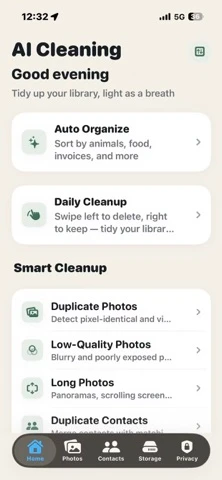
Step by step
How to Organize iPhone Photos with AI in 5 Steps
Use this practical workflow, then review the detailed guidance and safeguards below.
Download AI Cleaning free from the App Store. Optional monthly and yearly subscriptions unlock Pro features.
Allow the app to access your photo library so it can analyze and categorize your photos locally.
Background analysis may already be underway. The optional Pro feature groups photos into animals, plants, food, restaurants, group photos, documents, invoices, receipts, and ID cards.
Inspect meaningful categories like documents, receipts, and ID cards before any cleanup to avoid accidental deletion.
Use the duplicate, blurry, screenshot, and large-media categories to find safe cleanup opportunities with real storage numbers.
Choose the right organizer
Use Apple Photos first; add AI Cleaning for a cleanup workflow.
Apple Photos already organizes the library into curated collections and memories. The dedicated app adds nine task-specific categories and review groups in one cleanup path.
Decision workflow
Useful categories make review faster and less risky.
A generic gallery cleaner can push users toward deleting too quickly. A better organizer separates library understanding from deletion, so users can inspect important memories and documents before removing anything.
Animals, plants, food, restaurants, group photos, and daily-life scenes.
Documents, receipts, invoices, and ID cards need careful review before cleanup.
Duplicates, similar photos, screenshots, blurry shots, and large videos are better cleanup candidates.
For iPad-specific screenshots, document scans, camera imports, and iCloud sync checks, see the iPad photo organizer guide.
Practical answers
What to check before deleting photos.
Why classify photos before cleanup?
Classification separates valuable photo groups from likely cleanup groups, reducing the chance that users delete documents, receipts, ID cards, or meaningful memories by mistake.
What makes AI Cleaning different from a generic cleaner?
AI Cleaning positions smart classification as the first step, then connects it with duplicate review, screenshot cleanup, blurry photo review, and storage analysis.
Where should duplicate cleanup start?
Start with visually similar or exact duplicate groups, then review context before deleting. See the duplicate photo cleaner guide.
Does the iPhone Photos app already organize photos?
Yes. Apple Photos provides curated collections, memories, search, People and Pets, and a Duplicates album. A dedicated organizer can add a task-specific classification and cleanup workflow.
Which nine AI photo categories does AI Cleaning use?
Its optional Pro classification groups photos into animals, plants, food, restaurants, group photos, documents, invoices, receipts, and ID cards.
Is AI Cleaning free?
AI Cleaning is free to download and offers optional monthly and yearly subscriptions for Pro features.
Does AI Cleaning upload photos for classification?
The current App Store listing says AI computation runs on the iPhone, nothing is uploaded, and the app privacy label is Data Not Collected.