Photo storage cleanup
How to clean up iPhone photo storage for free.
Start with iPhone's free storage and duplicate tools. Review videos and screenshots before deleting, and check what iCloud Photos will sync.
Free iPhone tools
Clean up your photo library in five steps.
You do not need to install an app to check iPhone storage or merge exact duplicates. First compare the Photos category with available device space; then work through the library in small, reviewable groups. Storage saved will depend on what you actually remove.
Apple documents iPhone Storage, merging duplicates, and Media Types.
Open Settings, General, then iPhone Storage. Note the free space and the Photos usage before changing anything. Check Settings, your name, iCloud, then Photos to see whether iCloud Photos is syncing.
In Photos, open Collections, Utilities, then Duplicates. Review each set before tapping Merge. If Duplicates is missing, the library may still be indexing or no duplicates were found.
In Photos, open Collections, then Media Types to inspect videos. Use the Screenshots collection or the library filter to review screenshots. Select only items you no longer need.
Make an independent copy of irreplaceable originals before deleting. Select reviewed photos or videos in Photos and tap Delete. If iCloud Photos is on, deletion also affects your other synced devices.
In Photos, open Collections, Utilities, then Recently Deleted to recover mistakes. Permanently delete only items you are sure about; otherwise Apple keeps them there for 30 days. Recheck Settings, General, then iPhone Storage.
Keep or delete
Choose what happens to your originals.
Deleting is not the only way to reduce on-device storage. If you use iCloud Photos and have enough iCloud space, Optimize iPhone Storage can keep full-resolution originals in iCloud and smaller versions on your iPhone. It does not erase photos from your library.
Check Settings, your name, iCloud, then Photos for Optimize Storage. This uses iCloud storage, which is separate from iPhone storage and may require a paid plan for a large library. See Apple's iCloud Photos guide.
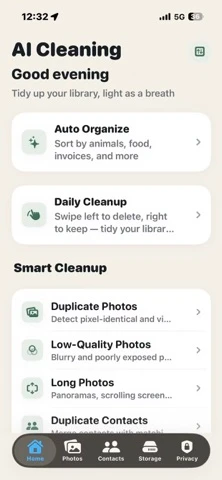
After using Apple's Duplicates tool, AI Cleaning can group visually similar photos, screenshots, and large media for manual review. It is free to download; check the current App Store listing for any optional Pro features before relying on them.
With iCloud Photos on, deletion syncs across devices. Recently Deleted normally holds items for 30 days; permanent deletion cannot be undone. Check Apple's delete and recovery instructions before clearing it.
For iPad libraries, review screenshots, documents, imported media, and iCloud sync behavior in the iPad photo organizer guide.
FAQ
iPhone storage cleanup questions.
What is the fastest free way to clean up iPhone photos?
Start in Settings, General, iPhone Storage. Then use Photos' built-in Duplicates tool and review videos and screenshots before deleting anything.
Can a photo cleaner app clear iOS System Data?
No photo cleaner app can directly clear protected iOS System Data. Use iPhone Storage recommendations and focus on photos and videos you can review.
Does deleting iPhone photos also delete them from iCloud?
Yes, when iCloud Photos is on, deleting a photo also removes it from other synced devices. You can usually recover it from Recently Deleted for 30 days.