
Dual-camera capture · iPhone
TwoPic records the scene and your reaction together
Use the front and back iPhone cameras at the same time, then save one photo or video to your library. Switch between picture-in-picture, top-and-bottom and left-and-right layouts while framing.
Real product screen
Inside the app
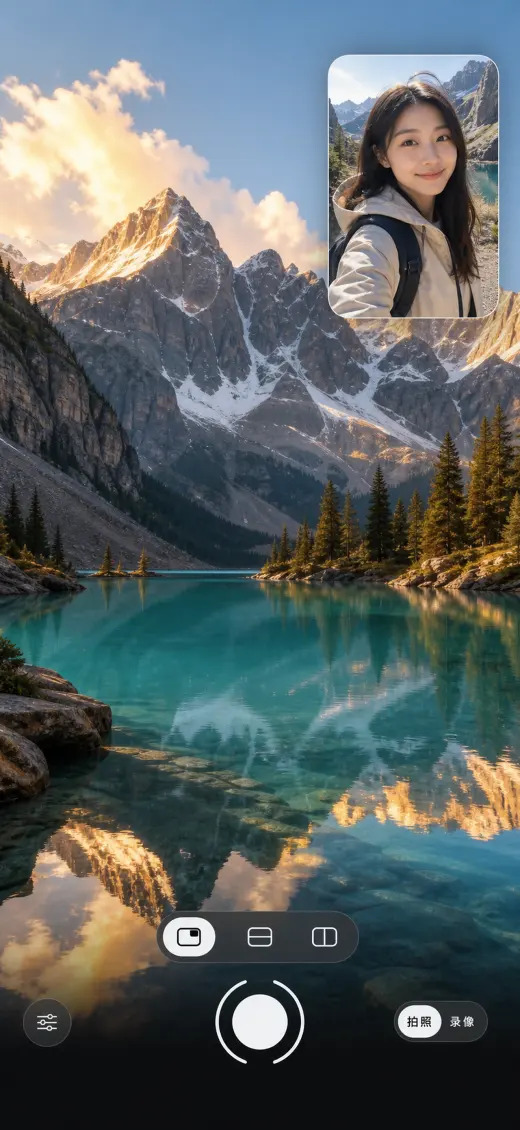
Capture
Three layouts, one moment
Both camera feeds stay live. In picture-in-picture mode, tap the small window to switch which camera fills the frame.
Shoot either format and save the result directly to the system Photos library.
Choose supported camera pairs, recording quality and microphone direction for your device.
Simultaneous capture requires an A12-class iPhone XS or newer and iOS 18.0 or later. The app reports unsupported hardware on launch.
Two viewpoints
Choose a layout for the moment
Frame the scene and your reaction together before capturing. The choice of layout determines how much space each viewpoint gets in the saved photo or video.
Keep the scene large and your reaction in the inset. Tap the small window to swap the main and secondary cameras when the explanation or reaction should fill the frame.
Give the two live views separate horizontal halves. This suits a composition where the scene and the person both need prominent space instead of a small inset.
Arrange the two views side by side. Check both halves while framing so a face, sign or other important detail is not cut off by the split.
Before you buy
Check the interface language and price
The current app interface is Simplified Chinese, even though this product description is in English. The US App Store listed an upfront $0.99 price on 30 September 2026; prices vary by region.
Version 1.1.3 refines these looks for photos and videos: stronger grain and a more faded vintage tone. Compare the live views before deciding which look suits the capture.
The App Store listing says TwoPic has no network access and the developer does not collect data; captures stay in your Photos library.
TwoPic captures both perspectives at once. The page does not promise automatic post-production or cloud syncing.
Common questions
Before you download
Does TwoPic require a newer iPhone?
Yes. Simultaneous front and back camera capture requires an iPhone XS or later with an A12-class chip and iOS 18.0 or later.
Is the TwoPic app interface available in English?
Not in the current version checked on 30 September 2026. Its interface is in Simplified Chinese, although the App Store description is translated.
Does TwoPic save both camera views together?
Yes. The chosen layout combines the front and back views in one photo or video and saves the result to the system Photos library.
Which permissions does TwoPic need?
Camera access enables capture, microphone access enables recorded audio, and Photos permission enables saving captures. You can manage these permissions in iOS Settings.
Regional App Store listings
Choose your local App Store listing.
Open a regional listing to check local prices, compatibility, supported app languages, and the features included in your store. This product page is in English; the app’s interface languages are listed separately in the App Store.